

Set a Template#
This guide addresses how to set a template for a deployable app.
There are two ways of building an application with a template: either we explicitly construct a pn.ui.Page or we set the global template and mark components as servable into its areas.
Explicit Constructor#
The explicit approach instantiates a Page directly and passes the components for each area as lists.
Let us construct a very simple app containing two plots in the main area and two widgets in the sidebar. Let’s save the script below into a file called app.py.
import hvplot.pandas
import numpy as np
import pandas as pd
import panel as pn

pn.extension(throttled=True)

xs = np.linspace(0, np.pi)
freq = pn.ui.FloatSlider(label="Frequency", start=0, end=10, value=2)
phase = pn.ui.FloatSlider(label="Phase", start=0, end=np.pi)

def sine(freq, phase):
    df = pd.DataFrame(dict(y=np.sin(xs*freq+phase)), index=xs)
    return df.hvplot(responsive=True, min_height=400)

def cosine(freq, phase):
    df = pd.DataFrame(dict(y=np.cos(xs*freq+phase)), index=xs)
    return df.hvplot(responsive=True, min_height=400)

plots = pn.ui.Row(
    pn.ui.Card(pn.ui.HoloViews(pn.bind(sine, freq, phase)), title='Sine'),
    pn.ui.Card(pn.ui.HoloViews(pn.bind(cosine, freq, phase)), title='Cosine'),
)

pn.ui.Page(
    title='Page Template',
    sidebar=[freq, phase],
    main=[plots],
).servable()
Note
A Page can be served or displayed just like any other Panel component, i.e. using .servable(), .show() or by rendering it in a notebook cell.
Now we can activate this app on the command line:
panel serve app.py --show
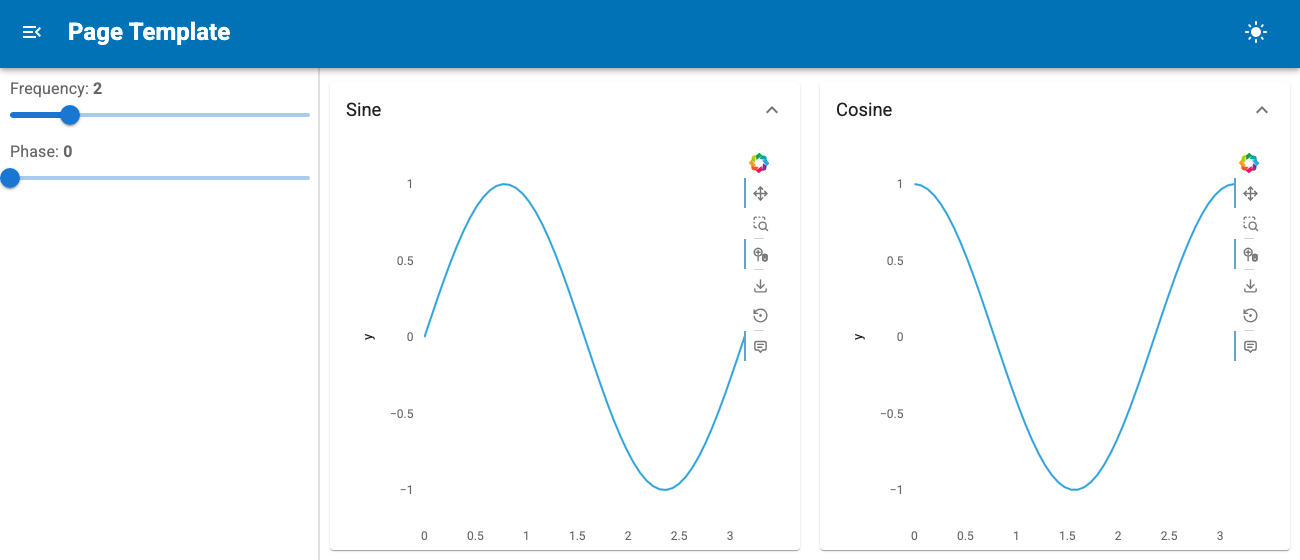
Global Template#
Another, often simpler approach is to set the global template with pn.extension(template='page'). Once the global template is set, we can add components to its areas using .servable(target=...); the valid targets are 'main' (the default), 'sidebar', 'header' and 'contextbar'. The global Page itself is available as pn.state.template, e.g. to set its title. Let’s create the same app as above using this approach and save it into a file called app_global.py.
import hvplot.pandas
import numpy as np
import pandas as pd
import panel as pn

pn.extension(template='page', throttled=True)

xs = np.linspace(0, np.pi)
freq = pn.ui.FloatSlider(label="Frequency", start=0, end=10, value=2).servable(target='sidebar')
phase = pn.ui.FloatSlider(label="Phase", start=0, end=np.pi).servable(target='sidebar')

def sine(freq, phase):
    df = pd.DataFrame(dict(y=np.sin(xs*freq+phase)), index=xs)
    return df.hvplot(responsive=True, min_height=400)

def cosine(freq, phase):
    df = pd.DataFrame(dict(y=np.cos(xs*freq+phase)), index=xs)
    return df.hvplot(responsive=True, min_height=400)

pn.ui.Row(
    pn.ui.Card(pn.ui.HoloViews(pn.bind(sine, freq, phase)), title='Sine'),
    pn.ui.Card(pn.ui.HoloViews(pn.bind(cosine, freq, phase)), title='Cosine'),
).servable(title='Page Template')
Now, we can activate this app on the command line:
panel serve app_global.py --show
The result is identical to the explicitly constructed Page above.
The classic templates ('bootstrap', 'fast', 'material', 'vanilla', …) can still be selected by name in the same way.
