

Azure Entra ID#
Previously known as Azure Active Directory.
To set up OAuth2.0 authentication for Azure Entra ID follow these instructions. Ensure that you supply the tenant ID using oauth_extra_params, a configuration may look like:
panel serve app.py \
--oauth-provider=azure \
--oauth-key='CLIENT_ID' \
--oauth-secret='CLIENT_SECRET' \
--cookie-secret='COOKIE_SECRET' \
--oauth-encryption-key='ENCRYPTION_KEY' \
--oauth-redirect-uri=REDIRECT_URI \
--oauth-extra-params "{'tenant': 'TENANT_ID'}" \
...
or with environment variables
PANEL_OAUTH_PROVIDER=azure \
PANEL_OAUTH_KEY=CLIENT_ID \
PANEL_OAUTH_SECRET=CLIENT_SECRET \
PANEL_COOKIE_SECRET=COOKIE_SECRET \
PANEL_OAUTH_ENCRYPTION=ENCRYPTION_KEY \
PANEL_OAUTH_REDIRECT_URI=REDIRECT_URI \
PANEL_OAUTH_EXTRA_PARAMS="{'tenant': 'TENANT_ID'}" \
panel serve app.py ...
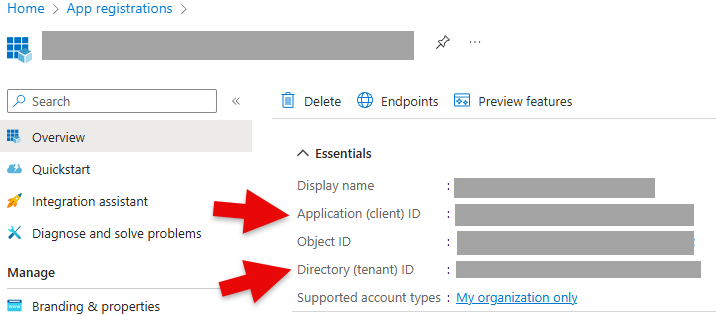
The CLIENT_ID corresponds to the Application (client) ID and the TENANT_ID to the Directory (tenant) ID below:
The CLIENT_SECRET corresponds to the Value below:

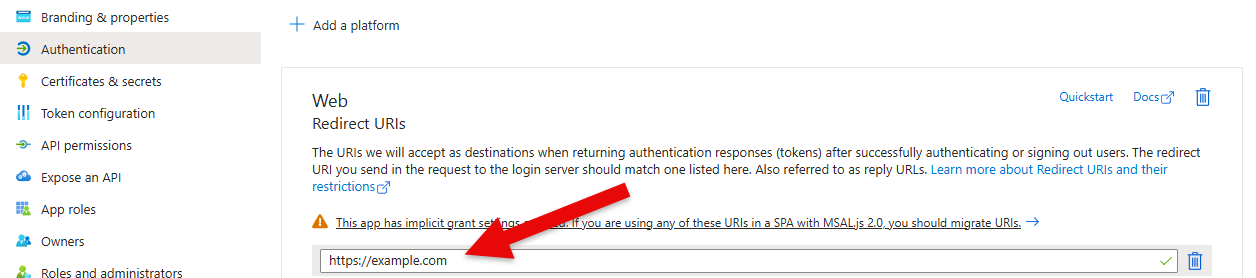
The REDIRECT_URI should be included in the list of Web Redirect URIs:
Handling multiple accounts#
Users who are signed into more than one Microsoft account in the same browser (for
example a corporate and a personal account) may be logged in with the wrong account,
or be confused about which account is used. You can control this by forwarding a
prompt parameter to the Azure authorization endpoint via oauth_extra_params:
panel serve app.py \
--oauth-provider=azure \
--oauth-key='CLIENT_ID' \
--oauth-secret='CLIENT_SECRET' \
--cookie-secret='COOKIE_SECRET' \
--oauth-redirect-uri=REDIRECT_URI \
--oauth-extra-params "{'tenant': 'TENANT_ID', 'prompt': 'select_account'}" \
...
prompt=select_accountalways shows the account picker so the user can choose which account to sign in with.prompt=loginforces the user to re-authenticate.
Restricting tenant to your directory ID (rather than common) additionally ensures
that only accounts from your organization are accepted.
Note
Forwarding arbitrary authorization parameters such as prompt requires the Panel
release that includes #8635.
Warning
Multiple accounts are sometimes mistaken for the cause of a Could not open websocket
error. That error is almost always a request-header size problem rather than an
account problem — see Troubleshooting OAuth for the diagnosis
and fixes.
