
Create Cross-Platform Apps with Toga#
This guide demonstrates how to convert a Panel application into a cross-platform desktop and mobile application using Toga and Briefcase.
Overview#
Toga is a Python native, OS native, cross-platform GUI toolkit. Combined with Briefcase, a tool for converting Python projects into standalone native applications, you can package your Panel application to run on Windows, macOS, Linux, iOS, and Android.
Unlike pywebview, Toga provides a native UI framework, allowing you to integrate native controls alongside your Panel web content.
What you’ll learn:
How to integrate Panel with Toga
How to package applications with Briefcase
How to create cross-platform distributions
Prerequisites#
Basic familiarity with Panel applications
Understanding of your target platforms
Git installed
Installation#
Install Briefcase, which will handle Toga and other dependencies:
pip install briefcase
Note
For Windows, this will install everything. For other OSes, refer to the BeeWare Tutorial | Install Dependencies guide.
Creating a Cross-Platform Application#
Step 1: Initialize a Briefcase Project#
Initialize a new project with Briefcase:
briefcase new
Briefcase will prompt you for project details:
Formal Name: “My Panel App”
App Name: “mypanelapp”
Bundle Identifier: “com.example.mypanelapp”
Project Name: “My Panel App”
Description: “A Panel app packaged with Toga”
Author: Your name
Author’s Email: Your email
URL: Your project URL
License: Choose a license
GUI Framework: Select “Toga”
Step 2: Create Your Panel Application#
Navigate to the source directory and modify the main application file. The structure will look like:
my_panel_app/
├── pyproject.toml
└── src/
    └── mypanelapp/
        ├── __init__.py
        ├── __main__.py
        └── app.py
Edit src/mypanelapp/app.py to integrate Panel with Toga:
import toga
from toga.style import Pack

import panel as pn

pn.extension(raw_css=["""
    body {
        background-color: white !important;
    }
"""])


class MyPanelApp(toga.App):
    """A Toga application that hosts a Panel app."""

    def __init__(self, *args, **kwargs):
        super().__init__(*args, **kwargs)
        self.server = None
        self.port = 0

    def create_panel_app(self):
        """Create your Panel application."""
        slider = pn.widgets.IntSlider(
            label='Value',
            start=0,
            end=100,
            value=50
        )

        def update_text(value):
            return f"## Slider Value: {value}"

        text = pn.bind(update_text, slider.param.value)

        app = pn.Column(
            "# Panel in Toga!",
            "This Panel app is running inside a Toga native application.",
            slider,
            text,
            pn.pane.Markdown(
                "You can deploy this to Windows, macOS, Linux, iOS, and Android!"
            ),
        )

        return app

    async def start_panel_server(self, widget, **kwargs):
        """Start the Panel server asynchronously."""
        app = self.create_panel_app()

        # Start Panel server on a random available port
        self.server = pn.serve(
            {'/': app},
            port=0,  # Use 0 to get a random available port
            show=False,
            start=True
        )

        # Get the actual port that was assigned
        self.port = self.server.port

        # Update the webview URL
        self.webview.url = f'http://localhost:{self.port}'
        self.status_label.text = f'Panel app running on port {self.port}'

    def startup(self):
        """Construct and show the Toga application."""
        # Create the main window
        self.main_window = toga.MainWindow(title=self.formal_name)

        # Create a status label
        self.status_label = toga.Label(
            'Starting Panel server...',
            style=Pack(padding=5)
        )

        # Create a webview to display the Panel app
        self.webview = toga.WebView(
            style=Pack(flex=1)
        )

        # Create the layout
        button_box = toga.Box(
            children=[self.status_label],
            style=Pack(direction='row', padding=5)
        )

        main_box = toga.Box(
            children=[button_box, self.webview],
            style=Pack(direction='column', flex=1, background_color='silver')
        )

        self.main_window.content = main_box

        # Start the Panel server in the background
        self.add_background_task(self.start_panel_server)

        # Show the main window
        self.main_window.show()


def main():
    """Entry point for the application."""
    return MyPanelApp('My Panel App', 'com.example.mypanelapp')


if __name__ == '__main__':
    main().main_loop()
Step 3: Update Dependencies#
Edit pyproject.toml to include Panel and its dependencies:
[tool.briefcase.app.mypanelapp]
requires = [
    "toga>=0.4.0",
    "panel>=1.0.0",
]
Step 4: Test in Development Mode#
Test your application in development mode:
briefcase dev
This runs your application using your local Python environment, which is faster for testing and debugging.
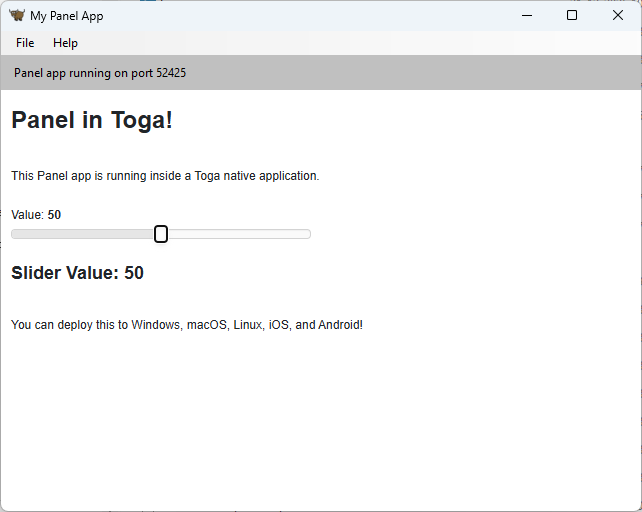
The app should look like:
Building and Packaging#
Desktop Applications#
Build for Your Platform#
Build the application for your current platform:
briefcase build
This creates a native application bundle in the appropriate format for your OS.
Run the Built Application#
Test the built application:
briefcase run
Package for Distribution#
Create a distributable package:
briefcase package
This creates:
Windows: An MSI installer
macOS: A DMG file
Linux: DEB or RPM packages
Mobile Applications#
iOS#
Build for iOS (requires macOS):
briefcase create iOS
briefcase build iOS
briefcase run iOS
Package for App Store:
briefcase package iOS
Note
We have not tested building Panel iOS apps with Toga and Briefcase. If you try it, we would love to hear about your experience.
Panel ships with a lot of JavaScript. Apple is strict about what gets packaged, so we don’t know if they’ll flag any of that during app submission.
Building for iOS requires a Mac, Xcode, and an Apple Developer account for distribution.
The BeeWare project provides iOS versions of Pandas and iOS versions of other dependencies with the eventual plan for these maintainers to create packages for iOS themselves.
Android#
Build for Android:
briefcase create android
briefcase build android
briefcase run android
Package for Google Play:
briefcase package android
Note
We have not tested building Panel Android apps with Toga and Briefcase. If you try it, we would love to hear about your experience.
Building for Android requires Android SDK. Briefcase will help you install it if needed.
